Phishing scams come in the form of fake messages designed to trick you into revealing passwords or sensitive information. These types of scams are among the most known and yet most dangerous, as they leverage curiosity and other emotions to bypass caution and rational thinking.
There are several types of phishing scams: whale phishing (phishing that targets CEOs and executives), spear phishing (phishing that targets people with financial access or decision-making capabilities), vishing (voice phishing), smishing (SMS phishing) and business email compromise (BEC) when the target is an organization.
How it typically happens
- The scammer initiates the contact with the victim through an email, text, phone call, or fake login page
- The message appears to be from a trusted company or contact
- The victim receives a urgent request to verify or fix something
- The links provided lead to a fake or malicious website.
Examples
Below is an example of a phishing email, prompting the recipient to click on a password reset link.
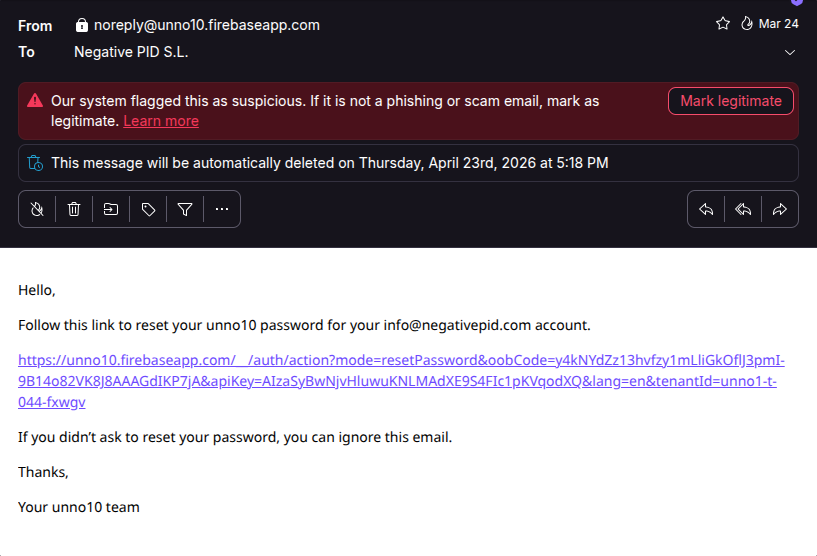
Your email provider should flag these requests as suspicious. However, always pay attention, as automated detection systems are not infallible.
Red flags
- Unexpected request
- Urgent or threatening tone
- Suspicious links or domains
- Poor spelling or formatting
- Request for login credentials
What to do
- Do not click on links or download attachments
- Verify the request directly with the sender or company
- If you interacted, change immediately your passwords
- Enable MFA (multi-factor authentication) where possible
Useful articles on online scams
- What is an online scam?
- Types of online scams
- Scam victimology: why did they pick me?
- How scammers choose their targets
- Why so many scams go unreported
- Scam cases that made the news
- AI and the next wave of scams
Useful articles on phishing scams
- The Melissa virus
- How to detect the signals of a fraud
- The illusion of generosity online
- CEO voice deepfake scams
- Computer-enabled crimes: virtual robbery
- A secure email setup guide
